
Silk Mobile
Table of Contents (Homepage)
- Overview
- Setting Up
- Getting Started
- How To
- Connecting Devices And Emulators
- Preparing Applications For Testing
- Managing Applications
- Recording Tests
- Working With Test Commands
- Adding Commands To Your Scripts
- Object Commands
- Click
- ClickCoordinate
- ClickIn
- ClickOffset
- Drag
- ElementGetProperty
- ElementGetTableRowsCount
- ElementListPick
- ElementListSelect
- ElementListVisible
- ElementScrollToTableRow
- ElementSendText
- ElementSetProperty
- ElementSwipe
- ElementSwipeWhileNotFound
- GetAllValues
- GetElementCount
- GetElementCountIn
- GetTextIn
- IsElementBlank
- IsElementFound
- IsFoundIn
- LongClick
- RunNativeAPICall
- SendWhileNotFound
- VerifyElementFound
- VerifyElementNotFound
- VerifyIn
- WaitForElement
- WaitForElementToVanish
- GetCoordinateColor
- DragDrop
- Application Commands
- Device Commands
- Web (Hybrid) Specific Commands
- Utilities Commands
- Monitoring Commands
- Configuration Commands
- ExtractLanguageFiles
- SetDefaultClickDownTime
- SetDefaultTimeOut
- SetDefaultWebView
- SetDragStartDelay
- SetInKeyDelay
- SetKeyToKeyDelay
- SetLanguage
- SetLanguagePropertiesFile
- SetShowImageInReport
- SetShowPassImageInReport
- SetShowReport
- SetSpeed
- SetThrowExceptionOnFail
- SetWebAutoScroll
- StartStepsGroup
- StopStepsGroup
- TextFilter
- Miscellaneous Commands
- Controlling Element Identification Rules
- Editing Test Objects
- Executing Test Scripts
- Report Of Executed Test
- Working From Code Environment
- Continuous Integration
- Layout Verification Tests
- Use Device Vitals Monitors
- Troubleshooting
- Terminology
Non-Instrumented Native Recognition
Silk Mobile can also recognize some Native elements in non-instrumented applications/screens on devices running under either:
-
iOS 7 or above
-
Android version 4.1 or above
-
Windows Phone 8.1
For This capability is particularly useful when creating automated test scripts which involved the settings of the devices.
To be able take advantage of Silk Mobile's non-instrumented Native Recognition capability on iOS devices, you must first set non-instrumented mode on the device (which requires iOS sign configuration. Please refer to Connecting an iOS Device
When using non-instrumented Native Recognition, Silk Mobile's Object Spy will highlight the application's elements by placing them in yellow rectangles, as can be seen below.
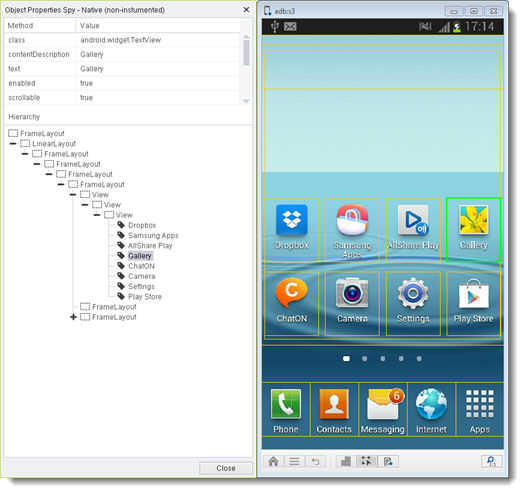
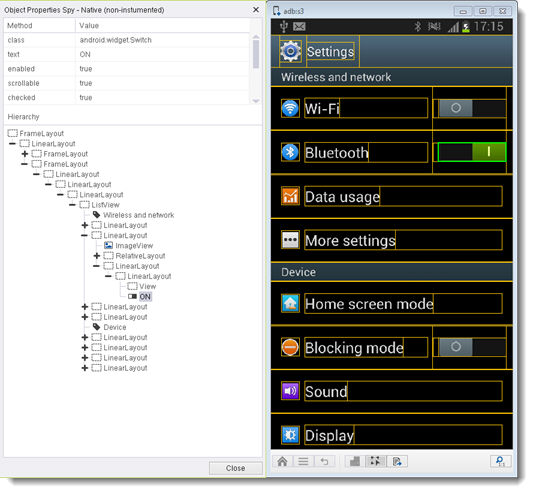

You can utilize such non-instrumented Native elements just like Native elements are defined for instrumented applications, meaning that you can use them to test the application by either:
-
Dynamically defining them during the recording of a test script, by assigning each such property the value "NATIVE" for its Zone, or
-
Refining their definition later on through Silk Mobile's Repository by making them properties of different types and for different devices under the Native tab of the Object/Element Properties dialog box.